Your First Runbook: The Minimum That Makes It Safe
Here is a runbook as it often first appears, on a wiki page titled "Thumbnail worker stuck":
Thumbnail worker stuck

sudo systemctl restart thumbnail-worker@1 thumbnail-worker@2 thumbnail-worker@3;
ls /srv/thumbnails/done;
If it's still stuck, ask the media team.
The author wrote it after the third time the same thing happened, and for the author it works. They know the three workers run on one server, that a restarted worker puts the job it was holding back in the queue, and that a stuck worker shows up as one quiet log beside two busy ones. For a task only its author will ever run, three lines like these are a good note and may be all the task needs.
The trouble starts when someone else opens the page at 03:10 with an alert on their phone. Nothing on it says which alert it is for, so a queue that is merely busy after a large upload looks the same as a stuck worker. It restarts all three workers when one was stuck, which interrupts the two that were working. Listing the done folder shows files, and says nothing about whether new ones are still arriving. "If it's still stuck" gives no time limit, so the reader has no way to know whether to wait five minutes or an hour before waking someone.
This piece turns that page into a runbook someone else can follow safely. The fields below are what move a page of commands from "works for its author" to "safe in a stranger's hands". Every service, server, and value here is constructed, apart from systemd's default timeouts. The template at the end also comes as a PDF field manual, with a field guide, patterns for other kinds of action, a review checklist, and a test record sheet.
Download the field manual (PDF) →
Runbook, playbook, and the words around them
These words get used interchangeably, so here is how this site uses them.
A runbook is a documented procedure that reaches one known outcome, such as one stalled worker restarted and completing jobs again, one certificate rotated, or one configuration file restored. AWS's OPS07-BP03 defines it as a documented process to achieve a specific outcome. A runbook covers one known case. Its checks confirm that this case is the one in front of the reader, and any other result sends the reader somewhere else. Everything else in this piece is about runbooks.
A playbook is the document you open while the cause is still unknown. AWS's OPS07-BP04 describes playbooks as step-by-step guides used to investigate an incident. A playbook gathers evidence, narrows the possibilities, and ends by pointing to a runbook, or by escalating when no runbook fits. The queue-age alert in this piece could come from a stalled worker, a full disk, or a backlog after a large upload. A playbook would investigate each of them. The worked runbook below does less: its checks confirm the one case it fixes, a stalled worker, and send every other result to escalation. Writing a playbook leaves the runbook intact: it becomes one of the playbook's exits.
Runbooks and playbooks travel in opposite directions depending on when you look. During an incident, a reader starts at the playbook while the cause is unknown, and leaves through a runbook when the evidence matches a known cause, or through escalation when it matches none. Writing usually goes the other way round. Someone writes the runbook first, for the one cause they have seen, and the playbook gets written above it when the same alert turns up a second cause. Investigations feed runbooks too: when a playbook branch keeps ending at the same fix, that fix has earned a runbook of its own.
A standard operating procedure covers planned, recurring work with no alert behind it, such as a weekly audit or a monthly patch window. It often calls runbooks for its individual steps.
An automation script is code that performs some of a runbook's steps, and it earns trust only after the runbook under it has been tested by people. Its comments should let a reader trace each block back to a step. An automation workflow goes further: an event starts it, and it gathers evidence, checks a policy, takes an action, and verifies the result without a person driving each step. Both are later stages of a document a person already trusts.
A post-incident review looks back after an event and decides what to change, often including the runbooks and playbooks that were used.
Some teams also call a communication handbook a playbook, a set of rules for writing updates during an incident. Ansible, a configuration-management tool, uses the word for a YAML file of automation tasks, and running one usually changes the hosts it targets. In this site's terms that file is automation, so "run the playbook" in an incident channel can mean opening a diagnostic page or executing code against production. Say "Ansible playbook" for the YAML. A runbook step that runs one is an action like the restart below: name the exact file and the one host, and let the verification section test the outcome. When someone hands you a playbook, check which kind it is before you act on it.
The fields a first runbook needs
The table below lists the thirteen fields a full runbook standard carries. A first runbook needs most of them in a short form, and can leave two for later.
| Field | What it protects | In a first runbook |
|---|---|---|
| Title and identifier | An alert can link to exactly one page | Yes |
| Scope and exclusions | A procedure for one case stays off a different case that looks the same | Yes |
| Trigger | The reader knows which alert or symptom sends them here | Yes |
| Desired outcome | Success is a state you can check, instead of "the command ran" | Yes |
| Impact and severity | Urgency matches the harm | Later |
| Authority and prerequisites | The reader knows who may act, with what access | Yes |
| Evidence checks | Read-only checks, each with its normal and abnormal result | Yes |
| Decision path | The evidence picks the branch | Yes |
| Action steps | One bounded action per branch | Yes |
| Rollback, or a statement that none exists | The reader can undo the action, or knows it cannot be undone before starting | Yes |
| Verification | The outcome gets proven instead of assumed | Yes |
| Communication and escalation | The reader knows who to call and what to hand them | Escalation yes; communication later |
| Ownership and review | Someone keeps the page current, and a reader can see how stale it might be | Owner and one dated test |
Impact, severity, and the communication plan can wait because a first runbook usually covers one well-understood fault on one service, and the incident process already decides who hears about it. When a runbook gets used, the commands run and a short extract of their output go into the ticket, with a pointer to where the full output is saved; Writing the Incident Ticket Someone Else Will Read covers what that record should hold.
The title does more work than it looks. "Thumbnail worker stuck" names a symptom, so it attracts every case that looks stuck, including the ones the page was never written for. "RB-MEDIA-004 Restart one stalled thumbnail-worker instance on media-01" names a verb, one thing, and one system. A title like that tells a reader which action and which system the page covers; the trigger and exclusions tell them whether it applies to their alert. An identifier stays the same when the wording changes, so an alert can link to it for years.
Three of the required fields are easy to leave out, because the author carries their answers in memory.
Exclusions come first. The author knows when the page stops applying, so the page never says. A reader who has never seen the service needs the cases that look similar and call for something else written down: a worker that has crashed outright, every worker stuck at once, a different server running the same software.
The desired outcome is the second. "Restart the stuck worker" is an action. "The queue is draining and all three instances are completing jobs" is an outcome, and the outcome is what tells a reader the work is done. A restart command that names one exact unit and returns cleanly shows the service manager restarted that unit. It shows nothing about whether jobs are flowing again.
Rollback is the third, and the honest answer is sometimes that none exists. A restart cannot be undone. Treat a deleted file as gone unless a restore path exists that someone has tested, such as a backup or a snapshot. When an action has no undo, the runbook says so before the action, and narrows the conditions for taking it: one instance, once, with the others healthy. When the action is safe only if something else already holds, such as a delete that needs a backup someone has restored in a test, or a failover that needs the old primary fenced so it cannot accept writes, an evidence check proves that thing before the action runs. A backup file in a listing is weaker proof than a restore, and a primary that stops answering health checks may still be accepting writes on the far side of a network split. A missing rollback section reads as "nobody thought about it", which is a different message from "there is no undo, so the entry conditions are strict".
Write it in this order
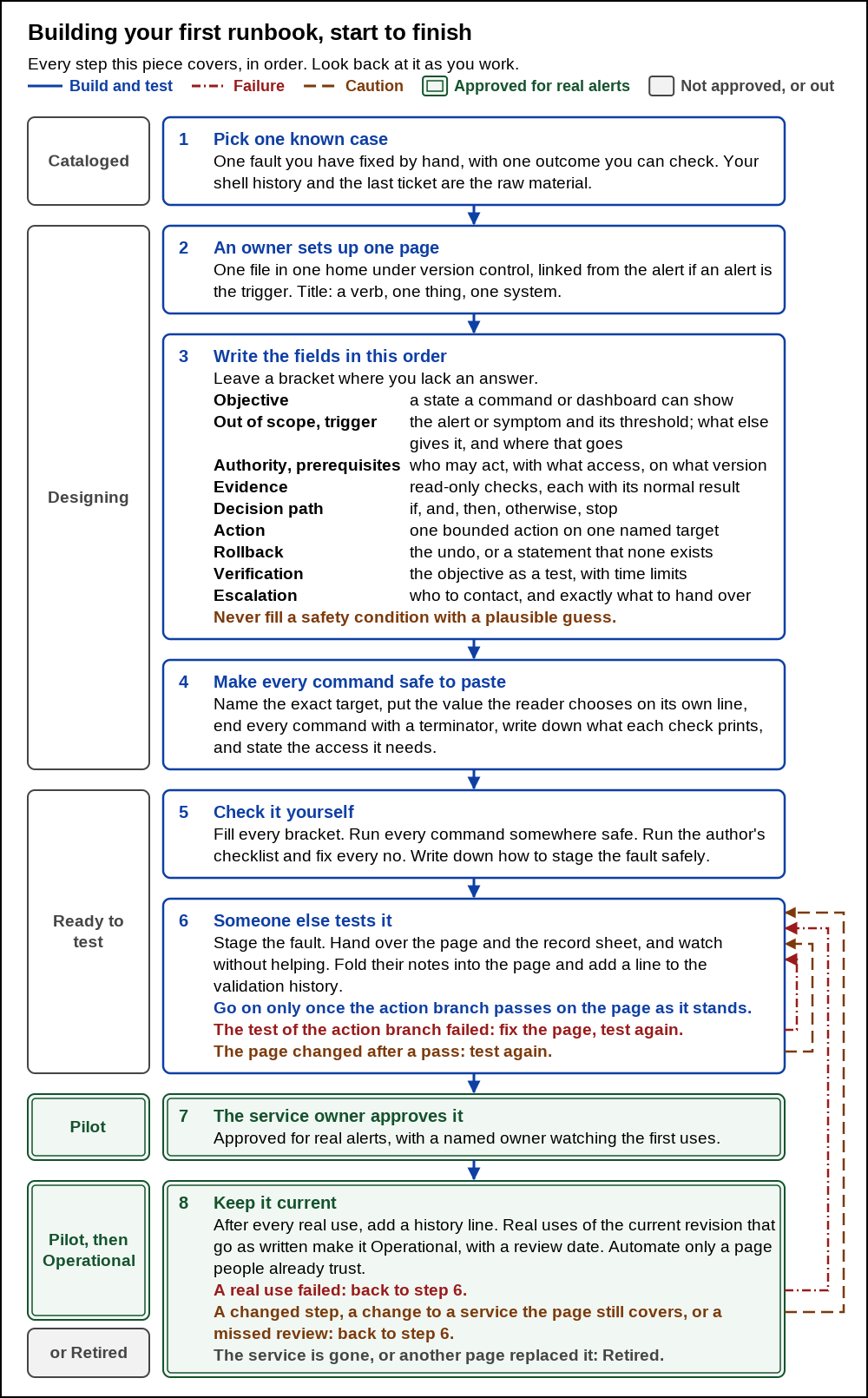
It is natural to write a first runbook top to bottom in the order you ran the commands. That order puts the action near the top, because the action is what the author remembers. A stranger needs it near the bottom, behind the checks that decide whether it applies. Writing the fields in a different order from the one they appear in fixes that.
Start with the objective. Every later field serves it: verification is the objective restated as a test, and the evidence establishes the case, its scope, and the conditions for acting. Write the exclusions and the trigger next, while the objective is fresh, by asking what else produces the same alert. For this service, a worker that has crashed, a full disk, and a backlog after a large upload all age the queue. Each one that needs a different response goes on the out-of-scope line with a pointer to where the reader should go instead.
Then work out the authority and prerequisites (who may act, with what access, on what version) and write the evidence checks, each with what it prints and which results are normal. Only then write the decision path, because a branch condition is written in terms of evidence output ("E2 shows zero for exactly one instance") or a named prerequisite, and a condition can only name something that already exists. The action comes after the branches, the undo or the no-undo statement after the action, verification after that, and escalation last.
Your own shell history and the last ticket are good raw material. Commands you actually ran are most of the evidence section and the action. Your running order is rarely the order a stranger should, because you ran the restart as soon as you were sure, and your certainty is the one part the page cannot carry.
The last step is handing the page to someone else, covered below. Automation comes after that: document the manual process, have someone else run it, and automate later, beginning with short runbooks that get used often.
Branches instead of steps
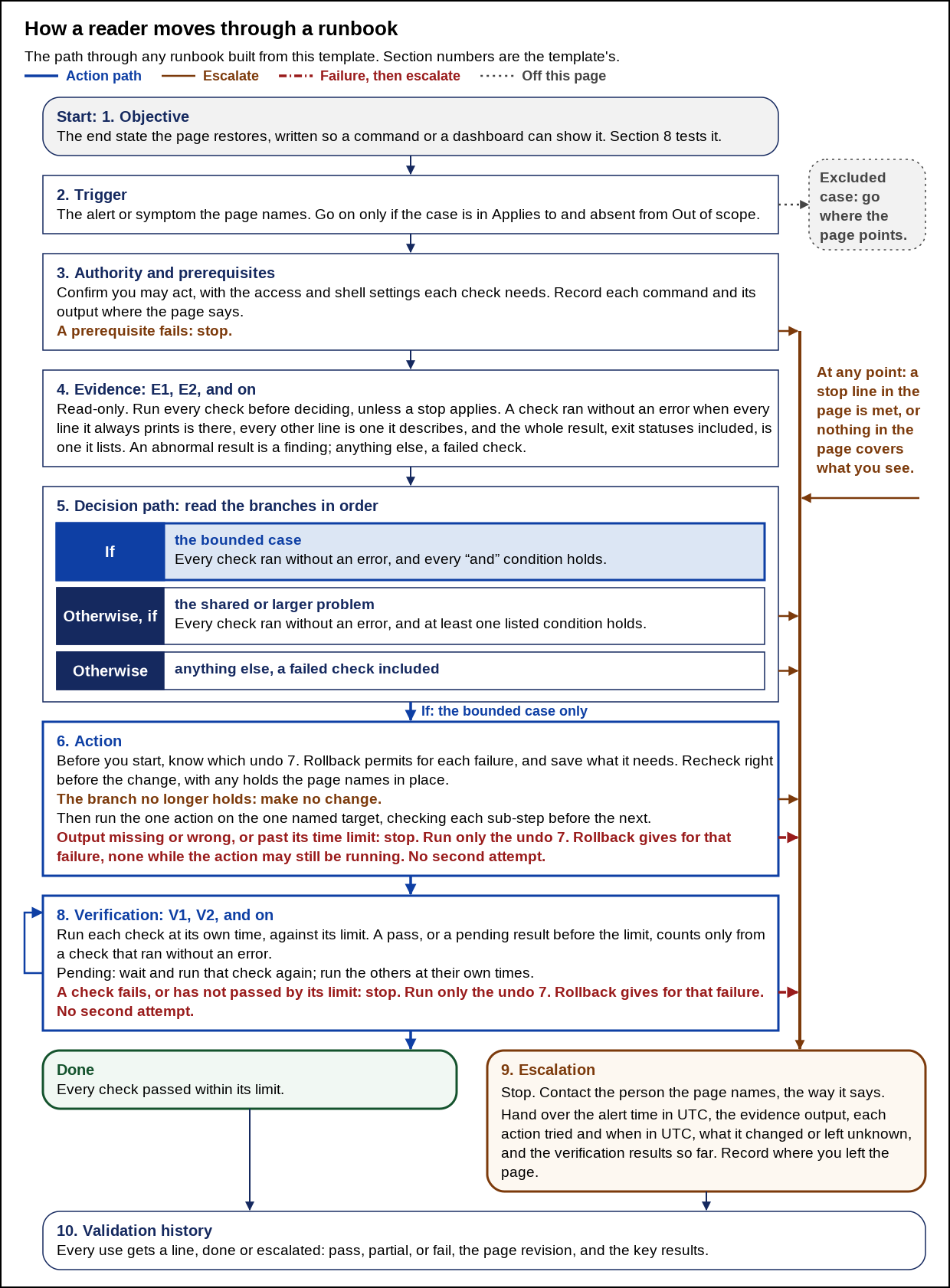
A list of steps tells the reader what to do. A branch tells the reader when to do it, and what to do instead when the conditions are wrong. The form is short:
If [observable condition],
  and [scope or risk condition],
  then [one bounded action].
Otherwise,
  collect [named evidence] and escalate to [owner].
Stop if [harm condition] appears.
Each line has a job. An "if" names something the reader can see in command output, never a feeling such as "the worker seems stuck". "And" lines are where most of the safety lives: they keep a correct command away from the wrong system, the wrong scope, or the wrong moment. A "then" is one action, so a reader never runs a chain of different remedies on a single judgment. One action can still take a few commands in a set order, such as restoring a file, reloading, and starting, as long as each step has a check and the page stops at the first check that fails, running only the undo it gives for that failure. A step that cannot be undone goes as late as the operation allows, after every check and every step that can be undone. "Otherwise" makes escalation the default instead of improvisation. The "stop" line marks where the runbook runs out.
Here is the wiki page's restart, rewritten as a branch (the full runbook below adds the authority and prerequisites this short form assumes):
If every check ran without an error,
  and one worker instance has logged no completed job in 10 minutes,
  and the other two instances have each logged their usual 20 or more,
  and all three are still running,
  and that instance has held a file in its working folder for over 10 minutes,
  and the disk is under 85 percent full,
  and no restart command ran for any instance in the last hour,
  and none ran for that instance in the last 24 hours,
  then restart that one instance.
Otherwise,
  collect the evidence output and escalate to the media service owner.
Stop if a second instance goes quiet, any instance is in the failed
  state, or the restarted instance completes nothing within 5 minutes.
Each "and" rules something out. Two instances working at their usual rate make it likely that the parts all three share (the incoming files, the output folder) are working, which points at the one quiet instance; two slow instances call for a wider look, so the page sends them elsewhere. If all three were quiet, the evidence would no longer show the one-instance case this restart covers. A file the quiet instance took more than 10 minutes ago, still in its working folder, shows it is holding a job it never finished, as opposed to sitting idle with nothing to do. The disk line checks a shared condition that calls for a different response even while two instances are still completing jobs. The two restart lines keep one instance from being restarted again and again: a stall that comes back within a day goes to the owner.
Commands a stranger can paste
The commands in a runbook get pasted by someone who has never typed them before, often through a chat window or out of a ticket. Five habits keep that safe.
Name the exact target. A tidier author might shorten the wiki page's three instance names to thumbnail-worker@*.service. Quoted, a pattern like that reaches systemctl(1), which matches it against every unit currently in memory, so it restarts all three; the systemctl(1) manual page's own example, systemctl stop "sshd@*.service", stops every sshd instance. Unquoted, the shell can first expand it against file names in the current folder, so what systemctl receives depends on where the reader is standing. A pattern that matches nothing is skipped without an error, so a typo in a glob can also do nothing and look like success. A runbook names the one unit it means.
Put the value the reader chooses on its own line, before the command that uses it:
instance=2;
sudo systemctl restart "thumbnail-worker@${instance}.service";
A reader changes one line. The command underneath stays exactly as it was tested, and a reviewer can see at a glance which part is meant to change. Keep that name for the target alone. A check that loops over every instance needs a name of its own, such as worker: written for instance in 1 2 3, the loop leaves instance holding 3 when it finishes, whichever instance was restarted (tested in bash 5.2).
End every command with a terminator: ; where the next command should run whatever the one before it returned (with errexit off, as the prerequisites require), && where the next command must run only if the one before it succeeded. A trip through a chat client, a ticket field, or a remote console can lose line breaks, and a terminator keeps the boundary when that happens. Surviving Hostile Remote Shells covers what else a paste can lose on the way, and where a terminator does not belong.
Write down what each check prints, normal and abnormal. "Normal: only the line find exit 0" beside a find command tells the reader that a file path means something is wrong. Without it, the reader sees a file path and has to guess whether that is good news.
State the access each check needs. By default, journalctl(1) lets a user read their own journal where one exists, and opens the system journal to root and members of the systemd-journal, adm, and wheel groups; an administrator can grant more through access control lists (ACLs). A reader without that access gets a count of zero from the check, and the one notice journalctl prints ("No journal files were opened due to insufficient permissions.") is easy to miss among three results. The prerequisites section says which access the evidence needs, so an empty result means what it appears to mean.
That notice is why the evidence section defines "ran without an error" by listing what each check prints. A rule like "any error a check prints means it failed" depends on the reader noticing a line on standard error, and on that line reaching the ticket. List every line a check can print, normal and abnormal, and count anything else as an error, the permission notice included. Where a check is a pipeline, print each command's exit status by name after it. A bash pipeline reports only its last command's status (unless the shell sets pipefail), so journalctl ... | grep -c hides a journalctl failure behind grep's count. A simpler check shows the same hole. Pointed at a missing folder, find ... | wc -l prints 0, and with pipefail off the pipeline exits 0; 0 is what a healthy queue prints. A status line after it, reading bash's PIPESTATUS, prints find exit 1, wc exit 0. Some nonzero statuses belong to findings: grep -c exits 1 when it counts nothing, so the page lists a count of 0 with journalctl exit 0 and grep exit 1 as an abnormal result. Each pipeline costs one more line, and the page now depends on bash with its errexit option off, which the prerequisites name and check: with errexit on, grep's exit 1 on a count of 0 ends the shell before the status line prints.
A worked runbook
This is the full runbook for the constructed service. Three instances of thumbnail-worker run on one server. Uploaded images land in an incoming folder; an instance claims one by moving it into its own working folder, writes a thumbnail to the done folder, and logs a line that starts "completed job" and names the file. An alert fires when the oldest file in the incoming folder is more than 15 minutes old.
RB-MEDIA-004  Restart one stalled thumbnail-worker instance on media-01

Owner:         media service on-call (role); service owner: media platform lead
Status:        Pilot, page revision 2 (retested in staging by a second
               operator, 2026-11-05 UTC; approved for real alerts by the
               media platform lead, 2026-11-06 UTC, who watches the first
               uses)
Next review:   2027-02-01, or after any change to thumbnail-worker
Lives at:      operations-runbooks repository, media/RB-MEDIA-004.md
               (the authoritative copy); alert THUMBNAIL-QUEUE-AGE links
               here by identifier
Applies to:    media-01, thumbnail-worker@1 to @3, worker version 2.3 or later
Out of scope:  other servers or services; an instance in the failed state
               (use RB-MEDIA-002); slow instances, two or more quiet
               ones, disk use at 85 percent or more, one quiet
               instance holding no file,
               or a backlog after a large upload with all three busy
               (escalate, by Branch B or C as section 5 decides;
               nothing here to restart)

1. Objective
No file in /srv/thumbnails/incoming is older than 15 minutes, and all
three instances are logging completed jobs.

2. Trigger
Alert THUMBNAIL-QUEUE-AGE: oldest file in /srv/thumbnails/incoming is
older than 15 minutes.

3. Authority and prerequisites
- The on-call operator may restart one instance, once per hour, with no
  change record. A restart counts once its command is run, even if it
  fails. Before section 6, check the ticket and the on-call
  handoff for a restart of any instance in the last hour, and of the
  instance E2 shows at zero in the last 24 hours, dating each restart
  by the time written in the ticket just before it; if there was either,
  or you cannot tell, the service owner decides. Anything beyond that
  needs the owner. The team lets only the ticket's assignee act on this
  alert: assign the ticket to yourself before E1 and check that it
  shows you; if it shows someone else, they decide, and you make no
  change. When you escalate, assign the ticket to the person you hand
  it to.
- A bash shell on media-01 with errexit off. E1, E3, E4, and V2 need
  no sudo: the on-call account can read the unit state, the working
  and incoming folders, and the disk use they check, and can see the
  current state of THUMBNAIL-QUEUE-AGE. The exit status lines read
  bash's PIPESTATUS; with errexit on, grep's exit 1 on a count of 0
  (E2, V1, V3) ends the shell before its status line prints.
  Check it before E1:
    [[ -o errexit ]] && echo "errexit on" || echo "errexit off";
  Normal: "errexit off". If it prints "errexit on", run
  set +o errexit; and check again.
- sudo, which E2 (and V3, its rerun), section 6, and V1 use as
  written. Without a sudo rule, sudo prints an error (the tested one
  names the sudoers file), and in E2 and V1 the count shows 0. Run
  without sudo by a reader who lacks access to the system journal,
  journalctl prints a notice such as
  "No journal files were opened due to insufficient permissions."
  and the count shows 0. E2 and V1 describe neither line, so the check
  failed. sudo may ask for your password, or print its first-use
  notice, before a command runs; that is sudo talking, and no part of
  any check's output. An error from sudo is still an error.
- All three units run the same program on the default stop and start
  timeouts, 90 seconds each. Check every instance section 6 might
  restart:
    for worker in 1 2 3; do systemctl show "thumbnail-worker@${worker}.service" --property=Id,ExecStart,TimeoutStartUSec,TimeoutStopUSec; done;
  Prints four lines per instance. Normal: each ExecStart line names
  path=/opt/media/bin/thumbnail-worker, and
  TimeoutStartUSec and TimeoutStopUSec are both 1min 30s. Anything
  else: stop and escalate.
- Worker version 2.3 or later, which moves any file left in its working
  folder back to incoming when it starts. When it starts after a
  restart, it therefore requeues the job the instance was holding.
  Check the program the units run, by the path the check above printed:
    /opt/media/bin/thumbnail-worker --version; echo "version exit $?";
  Normal: one line naming version 2.3 or later, then "version exit 0".
  An earlier version, any other line, or any other status: stop and
  escalate, because an older worker can lose the held job.
- Paste each command and its output into the incident ticket as you go;
  every check here prints a few lines. For longer output, paste an
  extract and say where the full copy is saved.

4. Evidence (read-only; run all of it before deciding, unless a stop applies)
A check ran without an error when it printed each line its text below
says it always prints, every other line it printed is one its text
describes, and its result as a whole, exit statuses included, is one
listed there. An abnormal result, such as a count of 0 or a listed
file, is a finding: it decides the branch. A missing line, any other
line (journalctl's permission notice, a "No such file or directory"),
or any other result means that check failed (Branch C).
E1  Instance state
    for worker in 1 2 3; do systemctl show "thumbnail-worker@${worker}.service" --property=Id,ActiveState,SubState; done;
    Always prints Id=, ActiveState=, and SubState= for each instance.
    Normal: ActiveState=active and SubState=running for all three.
    Abnormal: any other state, such as ActiveState=failed.
E2  Completed jobs per instance, last 10 minutes
    for worker in 1 2 3; do printf 'instance %s: ' "${worker}"; sudo journalctl --unit="thumbnail-worker@${worker}.service" --since='10 minutes ago' --no-pager --output=cat | grep -c '^completed job '; printf 'instance %s: journalctl exit %s, grep exit %s\n' "${worker}" "${PIPESTATUS[0]}" "${PIPESTATUS[1]}"; done;
    Always prints two lines per instance: the count, then both
    exit statuses.
    Normal: 20 or more per instance while the queue has work, and
    both statuses 0 (journalctl exit 0, grep exit 0). Abnormal: a count
    of 0, with journalctl exit 0 and grep exit 1, or a count from 1 to
    19, with both statuses 0. Each count covers the 10 minutes before
    its own query: run the loop in one go, and again if interrupted.
E3  Files held in a working folder longer than 10 minutes
    find /srv/thumbnails/working -type f -cmin +10 -printf '%h %f %CY-%Cm-%Cd %CH:%CM %Cz\n'; echo "find exit $?";
    Always prints "find exit" and its status last; a held file adds a
    line before it.
    Normal: only the line "find exit 0". Abnormal: one or more lines
    naming a held file, then "find exit 0". A listed folder ends in the
    instance number (/srv/thumbnails/working/2 is instance 2). The move
    into the folder sets the change time that -cmin reads. An instance
    holds one file at a time, and a job takes about 20 seconds and never
    more than two minutes.
E4  Disk space
    df -h /srv/thumbnails;
    Always prints a header line and one line for the filesystem. The
    incoming, working, and done folders are plain folders on it.
    Normal: under 85 percent used. Abnormal: 85 percent or more.

5. Decision path
Branch A: one instance stalled
  If every check ran without an error,
    and E2 shows zero for exactly one instance,
    and E2 shows 20 or more for each of the other two,
    and E1 shows all three active and running,
    and E3 lists a file in that instance's working folder,
    and E4 shows under 85 percent used,
    and section 3's restart check found no restart in the last hour
      and none of that instance in the last 24 hours,
    then go to section 6 for that instance.
Branch B: slow or quiet instances, or the disk at its limit
  Otherwise, if every check ran without an error,
    and no instance is in the failed state,
    and at least one of these holds:
      E2 shows zero for two or three instances;
      E2 shows a count from 1 to 19 for any instance;
      E4 shows 85 percent or more used;
    then escalate with E1 to E4. Make no change.
Branch C: anything else
  Otherwise (a check ran with an error, an instance is in the failed
  state, or the evidence fits neither branch): escalate with the output.
  Make no change.
Stop at any point if a second instance goes quiet or any instance is
in the failed state, and escalate with the evidence collected so far.

6. Action (Branch A only)
Right before the restart, run E1 to E4 again, check that the ticket
still shows you, and repeat section 3's restart check in the ticket
and the on-call handoff. If the ticket shows someone else, Branch A
no longer holds, or it now points at a different instance, make no
change: escalate with both sets of output.
Set instance to the number the second E2 run showed at zero. The 2
below belongs to this example. Use only 1, 2, or 3: for any other
number, systemd starts a new, fourth instance. Just before you run the
second line, write the UTC time from a clock outside this shell in the
ticket; if anything delays the line, write a new time. The 3 minutes
below count from that time, any sudo prompt included.
    instance=2;
    sudo systemctl restart "thumbnail-worker@${instance}.service" && restart_time="$(date -u '+%Y-%m-%d %H:%M:%S.%6N UTC')" && echo "instance=${instance}; restart_time='${restart_time}';";
Expected, after any sudo prompt: one line, such as
instance=2; restart_time='2026-11-20 03:14:08.512340 UTC';
If that line is missing, anything else prints, or the restart has
not returned after 3 minutes, stop. No second restart. Escalate, and
say whether the restart returned; one that has not may still be
running: 3 minutes is this page's cutoff, set from the two timeouts
section 3 checked, and systemd can take longer than their sum.
Copy the line into the ticket. In a new shell, run section 3's errexit
check, then paste the line to set both values again.

7. Rollback
A restart cannot be undone. Section 5 limits it: one instance, once, and
only one that has completed nothing in 10 minutes. It holds one file at
a time (E3), so the restart interrupts at most one job: the one it
holds at that moment. A peer that stalls after E2 ran can show up in
V3. On startup the worker returns the held file to incoming for another
attempt. If the job runs again, its output name comes from its input
name, so the rerun overwrites its own earlier output and creates no
duplicate.

8. Verification
Run this section only after section 6 printed its line. V1 to V3 count
from restart_time, which that line holds.
V1  Within 5 minutes of the restart, the restarted instance logs a
    completed job. Uses instance and restart_time from section 6; in a
    new shell, run section 3's errexit check and paste the line section
    6 printed first. Always prints the count, then both exit statuses;
    a "Failed to parse timestamp" line means restart_time is empty or
    malformed.
    sudo journalctl --unit="thumbnail-worker@${instance}.service" --since="${restart_time}" --no-pager --output=cat | grep -c '^completed job '; printf 'journalctl exit %s, grep exit %s\n' "${PIPESTATUS[0]}" "${PIPESTATUS[1]}";
    Pass: 1 or more before the 5 minutes are up, with journalctl exit
    0 and grep exit 0. A job can take two minutes, so a 0 with
    journalctl exit 0 and grep exit 1 before then means wait and run
    it again.
V2  Within 30 minutes, the alert clears and this prints 0, then
    "find exit 0, wc exit 0":
    find /srv/thumbnails/incoming -maxdepth 1 -type f -mmin +15 | wc -l; printf 'find exit %s, wc exit %s\n' "${PIPESTATUS[0]}" "${PIPESTATUS[1]}";
    Always prints the count, then both exit statuses. Before the 30
    minutes are up, find exit 0 and wc exit 0 with a count above 0, or
    with the alert still active, means wait and run it again.
V3  Fifteen minutes after the restart, rerun E2, so its 10-minute window
    starts after the restart; it prints E2's lines. Pass, before the 30
    minutes are up: all three show 20 or more, and every status line
    shows journalctl exit 0, grep exit 0. Its loop leaves instance
    alone, so V1 still names the restarted instance.
Run each check at its own time, V3 included, even while V2 is still
pending. A wait applies only to a check that ran without an error.
If any check fails or ran with an error, or a second instance goes
quiet: stop. No second restart. Escalate.
If the same instance stalls again within the 24 hours section 3
counts, escalate even though V1 to V3 passed.

9. Escalation
Media platform lead, through the media service on-call rota. Hand over:
the alert time in UTC, E1 to E4 output, any restart run with the time
written before it (UTC) and what it printed, and the V1 to V3 results
so far.

10. Validation history
2026-11-02  staging  second operator  pass  Page revision 1, worker
            2.3.1; staged @2 frozen with SIGSTOP. Restart 10:12 UTC; V1
            2 at 10:15; V3 23 21 24 at 10:27; V2 0 and alert clear at
            10:33. Ran the page alone and asked how to confirm the
            requeue. Version check added to section 3.
2026-11-05  staging  second operator  pass  Page revision 2, worker
            2.3.1; same fault. Restart 14:02 UTC; V1 3 at 14:05; V3 24
            22 23 at 14:17; V2 0 and alert clear at 14:21. No page change.
2026-11-06  production  media platform lead  approved  Revision 2 for
            real alerts; the lead watches the first uses.
A few of its choices are worth tracing back to the fields.
The version check in section 3 is there because the restart is only safe if the worker requeues the job it was holding when it starts again. That behavior belongs to the software, and an older version could lose the job instead. The runbook states what the action does to work in progress, and gives the reader a way to confirm it on the server in front of them.
The journal line in section 3 exists for the reason in the previous section. E2 and V1 both count lines, and a count of zero from a reader who cannot see the system journal looks identical to a count of zero from a stalled worker. Naming the access, and the notice a reader without it sees, turns a silent misreading into a failed check.
Verification looks at completions and queue age, never at the restart command's exit status. systemctl restart stops the unit and starts it again (systemctl(1)), and a clean return from this page's restart, which names one unit, means exactly that. A worker can start cleanly and stall again on the same input, which is why V1 waits for a completed job and V2 waits for the alert to clear. V3 covers the other half of the objective: all three instances working again, the two that were never restarted included.
V1 reuses the instance number set in section 6 instead of setting its own. A V1 line that set instance=2 would check instance 2 after a reader restarted instance 3, and a healthy instance 2 would pass. For the same reason the evidence loops count with worker, so rerunning E2 for V3 leaves instance alone. Verification has to look at the thing the action touched. Section 6 records restart_time only once the restart has returned, to the microsecond, in UTC with the zone written out, so V1 counts only jobs finished after the restart, and the time in the ticket means the same thing to whoever reads it next; Every Local Timestamp in an Incident Record Needs an Offset covers why a time without its offset is ambiguous. Both counts match lines that start with "completed job", so a log line that merely mentions a completed job cannot pass for one.
E3 reads the change time with -cmin. An instance claims a file by moving it, and a move updates the file's change time while leaving its modification time at the upload. A file that waited 12 minutes in the incoming folder and was claimed a second ago is 12 minutes old by -mmin, and E3 would list it as held. By -cmin it is a second old.
The branches in section 5 are written with "Otherwise" so that a set of results can reach only one of them: A is checked first, B only when A fails, and C takes everything left, including any check that ran with an error. Branch B puts its alternatives on separate lines under one shared condition, so "every check ran without an error" applies to each of them. Written as one sentence of ands and ors, it leaves the reader to decide which conditions go together.
The 24-hour rule in section 8 exists because a restart can clear one instance's symptom and leave its cause in place. An instance that needs it again the next day has a problem its owner needs to hear about. Section 3 checks the same limit before the restart, so a restart recorded in the ticket or handoff sends the next reader to the service owner instead of to a second restart. Taking the ticket before E1 settles which of two people answering the same alert may reach section 6: the constructed team lets only the ticket's assignee act, and section 6 checks that the ticket still shows the reader.
Every command in section 4 only reads. A reader can run all of it and paste the output into the ticket before making any change to the service, and can still change their mind. The one command that changes state sits alone in section 6, behind the conditions in section 5.
When the reader leaves the page
The page is built to be followed as written. Its lines say when the restart is allowed, limit what it changes, check the result, and record what happened. Skipping or changing a line can remove a safeguard, and the reader may never see what that safeguard would have caught. A change the page asks for, such as setting the instance number from E2, is part of following it.
On this runbook, keeping the example's 2 when E2 showed instance 3 at zero targets the wrong instance: it can interrupt a working instance and leave the stall in place. Typing 4 names an instance nobody started; on a template user unit in the lab, the restart started it. A glob in place of the number can restart every instance it matches, working ones included. Reading only the counts in E2 lets a reader without journal access take a failed check for three stalls and escalate on that reading. A second restart sent before the first one's outcome is known can leave V1 counting from the first restart's time, if the second command fails. Skipping the recheck in section 6 acts on evidence that may already be out of date.
When the page and the server disagree, take the branch or the stop line the page gives for that result. Where no line covers it, stop, put what you ran and what it printed in the ticket, say where you left the page and why, and escalate. A use that left the page counts as a failed use. A Pilot or Operational page goes back to Ready to test, its owner works out whether the page, the reading, or the case was at fault, and the page moves on again only as the lifecycle table below says: a passing test of the action branch and the service owner's approval. The field manual gives the reason for every line of the worked runbook, so a reader who doubts a line can see what it protects.
Telling a written runbook from a tested one
A runbook the author has only written down describes what the author believes will happen. A test record from someone else who followed it, from the page alone, against a staged fault, shows what did happen. The test is easy to state: once a runbook is written down, have someone else on the team run it.
A status line on the page tells a reader which kind they are holding. These states come from a personal runbook standard and fit a first runbook as well as a large library:
| State | What it means | What changes its state |
|---|---|---|
| Cataloged | Captured from a note or a chat thread; nobody has reviewed it | An owner takes it on |
| Designing | Fields are being filled in; the author has run it at most | No brackets are left, the author has run every command somewhere safe, the author's checklist has been run with every "no" fixed, and there is a written way to stage the fault safely |
| Ready to test | Complete enough for someone else to try | A second person's test of the action branch from the page alone passes, and the service owner approves it for real alerts |
| Pilot | Tested outside the author's hands; approved for real alerts, with a named owner watching the first uses | Real uses of the current revision go as written; a change to a step or to a service the page still covers, a failed use, or a review date passed without a review sends it back to Ready to test |
| Operational | Trusted for the cases it names, with a review date | A change to a step or to a service the page still covers, a failed use, or a review date passed without a review sends it back to Ready to test |
| Retired | The service the page covers is gone, or another page replaced it; kept for history, with a pointer to what replaced it | Nothing; it stays as a record |
The worked runbook says Pilot because the changed page passed a staging retest, and the service owner approved it for real alerts and watches the first uses. No real alert has used it yet.
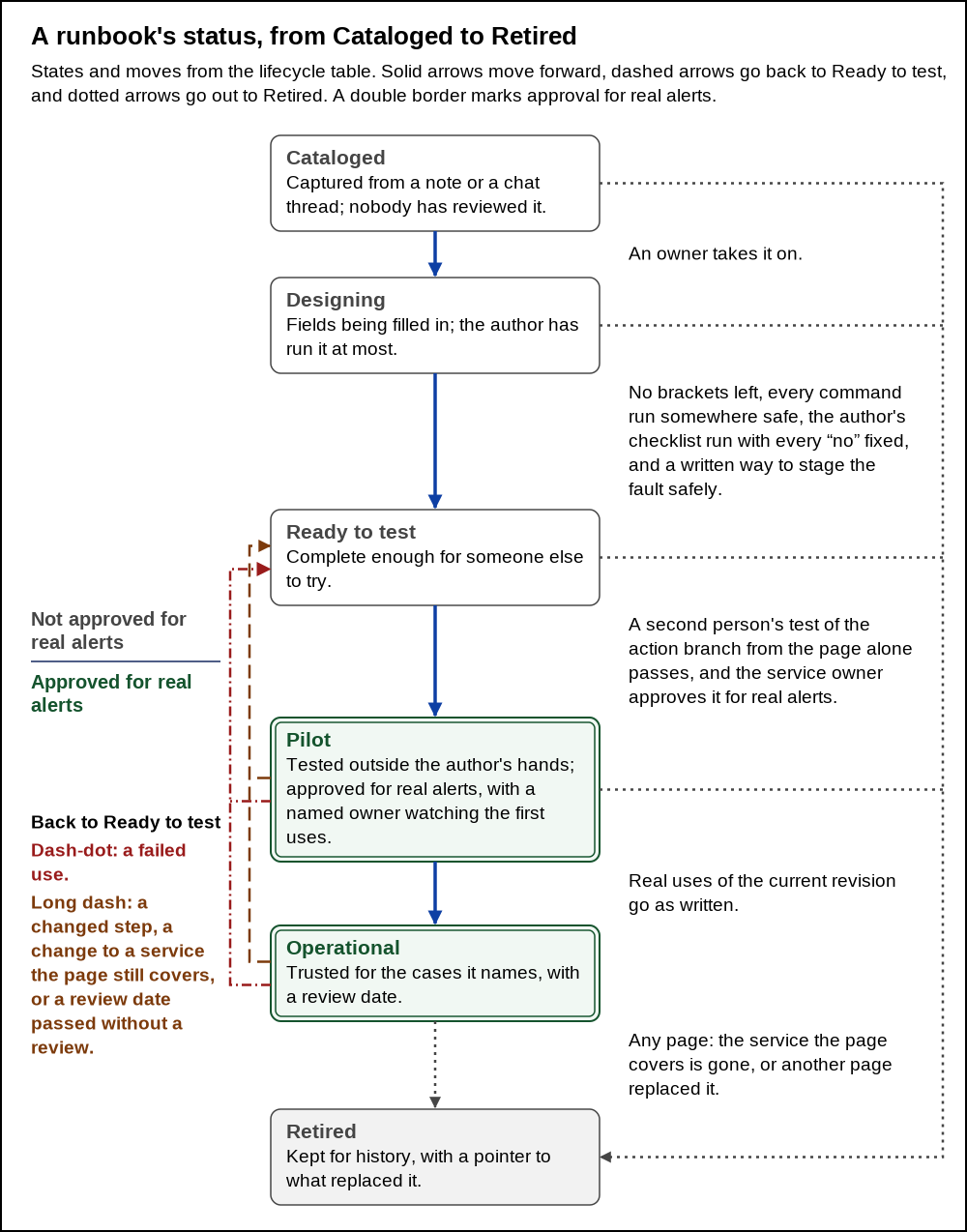
A validation date covers the page as it stood that day. When a step changes, or a service the page still covers changes, the old date stops covering the new version. A Pilot or Operational page goes back to Ready to test and moves on again only as the table says. A page whose service is gone is Retired instead. Writing the date next to the status keeps that visible.
Staging the fault is the part a first-time tester has usually never done. For this service, a stalled instance looks like a process that is alive and doing nothing, and a stopped process gives exactly that picture. Run this on the staging server only:
sudo systemctl kill --signal=SIGSTOP thumbnail-worker@2.service;The instance freezes. In the lab rehearsal on user units, the frozen instance still reported active and running, because the process exists, and it logged no completions while its job sat in the working folder; check that the staging server shows the same. The alert measures the oldest waiting file, so staging needs a feed of test images that takes all three instances to keep up. If two can keep up, the alert stays silent while an instance is stalled, which is worth writing down as a gap in the trigger. Before handing the test over, run E1 to E4 and confirm the staged fault is the whole Branch A case: every check runs without an error, all three instances show active and running, the frozen instance has held its file for more than 10 minutes, its E2 count is 0 while the other two show 20 or more, the disk is under 85 percent, and the staging record shows no restart in the last hour or of that instance in the last 24 hours. Branch A can hold before any waiting file reaches the alert's 15 minutes, so if the test is meant to include the alert, confirm that it fired as well. If the freeze landed between jobs, or the setup produces some other case, fix the setup or record the case it produces. The tester then follows the runbook with no help from the author. If the test ends before the restart in section 6 runs, resume the instance with sudo systemctl kill --signal=SIGCONT thumbnail-worker@2.service; and confirm it logs completed jobs again. The test sheet's rule then gives the result. This staged fault calls for Branch A, so a tester who followed the current page alone, ran every check without an error and recorded it, reached Branch A, and stopped before the restart records a partial; one who stopped on a failed check, a section 6 recheck included, found on that recheck that Branch A no longer held for that instance, reached Branch B or C, or needed the author's help records a fail. When the restart in section 6 runs, systemd sends SIGCONT right after the termination signal (SIGTERM by default) so that even a suspended process can exit cleanly (systemd.kill(5)); in the rehearsal, the instance came back. The tester records whether the restart returned and whether V1 to V3 passed.
What the tester writes down matters more than whether the test passed. Each place where they hesitated, guessed, asked a question, or left the page is a question for the author: does the page need a change there? In the constructed staging test, the tester asked how to confirm the restart would requeue the job, and that question became the version check in section 3. The first test no longer covered the changed page, which stayed at Ready to test and passed a second run three days later, which is why the history has two test lines before the approval line. Each history line records the date, the environment, who ran it, the result, and what changed. The field manual includes a record sheet for the tester to fill in as they go.
After that, the review triggers are plain. After every real use, compare what happened with the page, add a line to the validation history, and decide whether the page needs a change; a failed use or a changed step sends it back to Ready to test. Review it too after every change to the service it touches, and by the date written at the top. A Pilot or Operational page past its review date drops back to Ready to test. It still shows what worked when it was last run, and its last-validated date tells the reader how far to trust it.
Where the page lives
A runbook needs one home. List the owner, and publish the runbook in one central location under version control; both protect the reader. Version control shows who changed a step and when, and a commit message that says why answers the first question anyone asks after a runbook goes wrong. A named owner means a reader who finds a gap has someone to tell.
The worked runbook's "Lives at" line names the authoritative copy. Copies pasted into chat threads or saved to desktops drift from it unnoticed, and the reader at 03:10 cannot tell which is current. Link the alert to the page by its identifier, and make every other copy point back to the repository.
Reviewing someone's first runbook
A senior engineer reviewing a first runbook is checking whether a stranger could follow it safely, and nine questions cover most of that:
- From the title and trigger alone, could a reader tell whether this page is for their alert?
- Does the objective name a state a command or a dashboard can show?
- Is every known case that produces the same alert but needs something else listed as out of scope, with a pointer, and does evidence that fits no action branch escalate?
- Does every evidence check say what normal looks like, and what access it needs?
- Does every branch condition refer to the output of a numbered check or a named prerequisite in section 3, and does every combination of results reach exactly one branch?
- Does each branch that changes something name one bounded action, with its target named exactly? A branch that escalates makes no change to the service.
- Does the rollback section say how to undo the action, or say plainly that it cannot be undone?
- Does verification test the outcome, with a time limit, and say what to do when it fails?
- Who other than the author has tested it, where, and on what date?
Each "no", and each gap in the answer to question 9, points at a field. Send the review back as field names and the question behind each; the author learns more from that than from a page someone else rewrote. The field manual expands the first eight into an author's checklist, for use before anyone tests the page; question 9 waits for that test.
The template
Copy this and replace each bracket you can fill from something you have checked. Keep every section: where a line has no use on your page, say so and why, so a reviewer can tell a choice from something forgotten. Leave the rest bracketed, with the status at Designing. Keep the section numbers, so an escalation can say "E2 showed zero" and be understood. The field manual that goes with this piece is a PDF to print, or to keep beside a staged test. It carries the template as pages to write on, a field guide with a strong and a weak example for each field and three patterns for other kinds of action, the defects this runbook survived in review and the lab tests that settled them, the author's checklist, a test record sheet, and the worked runbook above with a note on why each line exists. Copy commands from this page, where each one sits on one line; the PDF wraps long lines to fit the paper.
[RB-identifier]  [Verb] [one thing] on [one system]

Owner:         [role that keeps this page current]; service owner: [role]
Status:        [Cataloged | Designing | Ready to test | Pilot | Operational | Retired],
               page revision [n]; last tested by someone other than the
               author: [not yet | who, where, YYYY-MM-DD UTC]
Next review:   [YYYY-MM-DD], or after any change to [service]
Lives at:      [repository and path of the authoritative copy]
Applies to:    [servers, service, instances, versions]
Out of scope:  [cases that look similar and need something else, with
               where to go instead]

1. Objective
[The end state, written as something a command or a dashboard can show.]

2. Trigger
[The alert or symptom that sends a reader here, with its threshold.]

3. Authority and prerequisites
- Who may run this without asking, and what needs approval: [ ]
- Access needed, check by check (sudo rule or group): [ ]
- The shell, and the settings its checks need (errexit off, say): [ ]
- What the action does to work in progress, and how to confirm it: [ ]
- Where to record commands and output: [ ]

4. Evidence (read-only; run all of it before deciding, unless a stop applies)
A check ran without an error when it printed each line its text says
it always prints, every other line it printed is one its text
describes, and its result as a whole, exit statuses included, is one
listed there. An abnormal result is a finding. Anything else, a
missing line included: Branch C.
[The checks below show the known cause this page fixes is present.]
E1  [What it checks]
    [command; after a pipeline, print each exit status by name;]
    Prints: [the lines it always prints; each other kind it can print]
    Normal: [ ]  Abnormal: [ ]
E2  [What it checks]
    [command; after a pipeline, print each exit status by name;]
    Prints: [the lines it always prints; each other kind it can print]
    Normal: [ ]  Abnormal: [ ]

5. Decision path
Branch A: [name of the bounded case]
  If every check ran without an error,
    and [observable condition],
    and [scope or risk condition],
    then go to section 6.
Branch B: [shared or larger problem]
  Otherwise, if every check ran without an error,
    and at least one of these holds:
      [condition];
      [condition];
    then escalate with [evidence]. Make no change.
Branch C: anything else
  Otherwise, escalate with the evidence collected. Make no change.
Stop at any point if [harm condition]; escalate with what you have.

6. Action ([branch] only)
[Checks to run again right before the action, because their results
 can change; how the page keeps other writers or runs off meanwhile;
 and what to do if the branch no longer holds.]
Set [value the reader chooses] first.
    [variable=value;]
    [the action: one command, or a set sequence of numbered sub-steps
     with a check after each;]
Expected: [what must print, and within how long]. If a line it must
print is missing, anything else prints, or it runs past that: stop.
Run only the undo section 7 gives for that failure, and none while the
action may still be running. Make no second attempt; escalate.

7. Rollback
[How to undo each step that changed something: what to save before
 it, which failures permit the undo, who may do it, and the check
 that shows the undo worked.]
[Or: This cannot be undone. Section 5 limits it by: (conditions), and
 a check in section 3 or 4 proves that (what must already be true,
 such as a backup restored in a test, or the old primary fenced so it
 cannot accept writes) holds. A file listing falls short.]

8. Verification
V1  [Check of one part of section 1, with a time limit]
    [command; after a pipeline, print each exit status by name;]
    Prints: [the lines it always prints; each other kind it can print]
    Pass: [value]. Still pending before the limit: [value].
[V2 and on, until every part of section 1 has a check.]
A pass or a pending result counts only for a check that ran without
an error, by section 4's rule. If verification fails: stop, run only
the undo section 7 gives for that failure, make no second attempt, and
escalate.

9. Escalation
[Role, and how to reach them.] Hand over: [alert time in UTC, evidence
output, each action tried and when in UTC, what it changed or left
unknown, verification results].

10. Validation history
[YYYY-MM-DD]  [environment]  [who ran it]  [pass, partial, or fail]
            Page revision [n], [service version]; case [staged fault,
            or what the real alert showed]; [key results, times in
            UTC]; [page change, or "No page change"]
[YYYY-MM-DD]  [environment]  [approver]  approved  Revision [n] for
            [what it is approved for]; [who watches the first uses]
A field you cannot fill in yet is information. Leave its brackets in place and set the status to Designing, and the next reader can see exactly which part of the page nobody has worked out.
Then start with one recovery you have done more than once. Write its objective and its exclusions first, run the checklist, and hand the page and the test record sheet to another engineer who has never run it. That test is what shows whether the page has become a runbook someone else can follow.
Where this material comes from
I built the worked runbook as a constructed example and rehearsed its freeze-and-restart behavior on my own lab workstation with systemd 259. The definitions of runbook and playbook are cited from AWS's published Well-Architected guidance, the way the man pages are cited for the commands. My knowledge of Ansible comes from research: Ansible's documentation and Red Hat's Ansible Basics: Automation Technical Overview course (DO007). That is why the Ansible paragraph above covers only what "playbook" means in Ansible and how a runbook step should name an Ansible run, and leaves how to write one to Ansible's documentation.
References
- AWS Well-Architected Framework, Operational Excellence Pillar, OPS07-BP03 Use runbooks to perform procedures.
- AWS Well-Architected Framework, Operational Excellence Pillar, OPS07-BP04 Use playbooks to investigate issues.
- Ansible documentation, Ansible playbooks.
- systemd-system.conf(5), systemd manual, DefaultTimeoutStartSec= and DefaultTimeoutStopSec=.
- systemctl(1), systemd manual, unit name patterns and restart.
- journalctl(1), systemd manual, journal access and output modes.
- systemd.kill(5), systemd manual, KillSignal=.
- find(1), GNU findutils, -cmin, -mmin, and -printf.
- systemd.time(7), systemd manual, timestamps with a time zone (the UTC suffix journalctl --since accepts).